
Strategic, tool-agnostic, and just the right amount of nerdy.
We’re advisors, not a software vendor, a reseller, or a managed service provider. But we’re advisors who build things. Before we recommend a platform, an automation, or an AI tool, we’ve usually tried it ourselves, often in an environment set up just for testing.
That matters for clients in three ways:
- We know what’s actually doable. If we tell you something can be built, it’s because we’ve built it, or something close to it.
- We can test a vendor’s claims. Demos are designed to impress. We find out what happens after the demo.
- We can speak to everyone at the table. Your leadership team, your IT provider, and your vendors each get an answer in their own language.
We test it before you trust it
We keep development tenants for the major platforms our clients use, including Microsoft 365. New features, settings, migrations, and client configurations get tried there first, where mistakes are free.
We also run our own business on the tools we recommend. When we’ve moved FireOak from one platform to another, those migrations changed how we work and what we tell clients. This website is one example. We moved it off a hosted platform to a fast, simple static site, built with Claude, and learned a lot about what AI coding tools can and can’t do along the way.
Things we’ve built
Most of our client work is confidential, so we describe the projects rather than name the clients.
A neutral tenant for a 1,000-page knowledge base. A client was rebuilding a highly technical knowledge base: more than 1,000 pages of detailed procedures, moving from on-premises SharePoint to modern SharePoint Online pages, with every page rewritten and every image updated. For several reasons, the client didn’t want an outside firm working directly in their Microsoft 365 tenant. So we set up a separate tenant just for the project. Our tools loaded the finished content there, and the client’s team moved it into their own tenant with their migration tools. We never needed access to their systems. Read the full story →
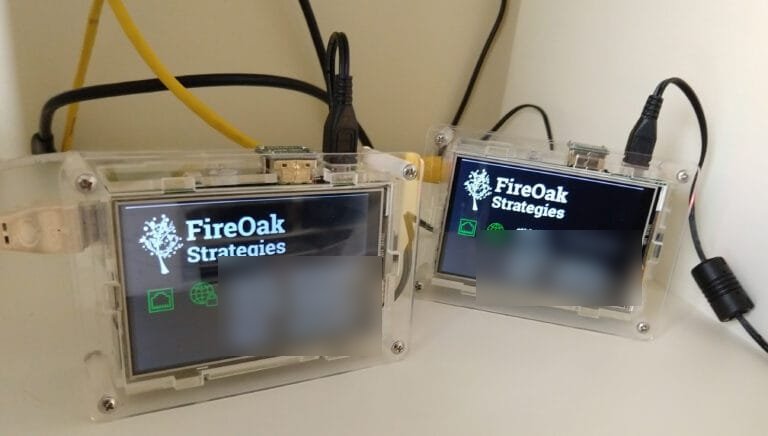
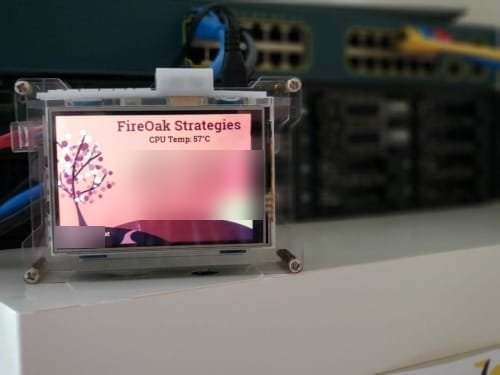
Network monitors for remote offices. A nonprofit based in Southeast Asia had several small, very remote offices with limited internet access, and no clear picture of what was using it. We built a custom Raspberry Pi image, with cases we designed and 3D printed, and deployed the devices to each office to track network traffic over time. Among other things, they showed that one office’s bandwidth was disappearing every afternoon because someone’s kid was stopping by after school to download media.
Financial dashboards that replaced spreadsheets. We started by building detailed dashboards for our own personal finances, then used the same approach to automate FireOak’s financial reporting. An external financial partner recently told us they were jealous of them.
Getting up to speed on Salesforce, fast. One client had committed to Salesforce for a large, complex project involving several outside partners, before anyone fully understood what that would take. Three of us became certified Salesforce administrators in short order, and we figured it out alongside them.
Automations we run every day. Automation is how a small team does the work of a much larger one. We run dozens of automations every day, maybe hundreds. Some handle research: technology trends, new cybersecurity threats, news in the fields our clients work in, and competitive intelligence for us and for clients. Others keep things running: backing up our databases and even the automations themselves, and moving information from one system to another so nobody has to retype it. And some are small but useful, like daily reminders and advance notice of upcoming subscription renewals (with amounts and categories), so we can decide what to keep before we’re charged. If you’ve wondered what’s worth automating in your own organization, we’re happy to share ideas.
And some we shelved
Not every experiment makes it. During the pandemic, we explored using Oculus VR headsets to give new staff orientation tours of client buildings they couldn’t visit in person. It was a fun idea, and it taught us a lot about where VR helps and where it gets in the way. In the end, we shelved it.
That’s normal. Plenty of our experiments never turn into client recommendations. But each one tells us something we can pass on to clients, including when not to bother.
Information professionals at heart
Every member of our team either holds a Master’s degree in Library and Information Science or has spent years (in some cases, decades) working in libraries, archives, or other information-heavy organizations.
That background shapes the questions we ask about any system:
- How should this information be organized?
- How will people find it?
- Who owns it, and who keeps it current?
- What should be kept, and what can go?
- Will it still make sense in five years?
- What happens when AI tools start reading it?
Long before AI made information architecture fashionable, these were the problems we enjoyed solving.
We like understanding how things fit together, on screen and off. Around here, that means puzzles of every kind (including 3D and mechanical ones), and lately, mosaics: a useful, screen-free way to think about how small pieces add up to something whole.
FireOak Acorn (2022)
Platforms we know well
We’re platform-agnostic. Our recommendations start with your goals, not our favorite software. That said, our work regularly includes:
Knowledge and collaboration
- Microsoft 365 and SharePoint Online
- Google Workspace
- Confluence and Atlassian
- Notion and Airtable
- Salesforce
- Monday.com, Asana, and ClickUp
- Box, Dropbox, and Google Drive
AI tools
- Claude and Claude Code
- ChatGPT and Codex
- Microsoft Copilot
- Google Gemini
- Perplexity
- Local models with Ollama and LM Studio
- Hermes Agent (new to us, and we’re learning quickly)
Automation and integration
- Make.com
- n8n
- Zapier
- Microsoft Power Automate
- OttoKit and Gumloop
- Airtable automations
- Fillout, Tally, and other form tools
- API integrations and Python scripting
Security and governance
- Microsoft Purview (compliance) and Entra ID
- Microsoft Intune and endpoint management
- Cloudflare (access controls, tunnels, DNS, firewall)
- Password managers (Bitwarden, 1Password, and others)
- Device management, multi-factor authentication, and policy enforcement
- Raspberry Pi devices for security and network monitoring
- Security reviews of cloud platforms, including WordPress, Microsoft 365, Google Workspace, and Salesforce
Websites and publishing
- Astro and other static site tools
- Cloudflare Pages
- Ghost and WordPress
- Plausible (privacy-friendly analytics)
- EngineMailer
Planning and migration
- Box to Microsoft 365 or Google Workspace
- Google Workspace vs. Microsoft 365 evaluations
- On-premises SharePoint to SharePoint Online
- SharePoint Online intranets and knowledge bases
- Consolidating overlapping tools and managing vendors
What we’re exploring right now
As of November 2026:
- Local AI models. We’re setting up open models on a range of decidedly not-state-of-the-art hardware, so we can give clients first-hand advice when they ask about running AI on their own infrastructure.
- Rethinking our own operations. Including invoicing (generating, sending, and tracking invoices is nobody’s favorite job) and how we run this website and our marketing.
- Voice to text with AI and automation. Turning spoken notes into something useful without retyping.
- Video with Claude and Codex. Just getting started. We hope to share some soon.
And 3D-printed cable management, which may or may not have become more complicated than buying some.
Keep exploring
- Technology strategy: setting priorities and a roadmap before major investments.
- AI strategy and implementation: deciding where AI fits, then making it work.
- Knowledge management: helping people find and trust information.
- Information and data governance: clear ownership and rules for your information.
- Client stories: how we apply all of this in practice.
Tell us what you’re working on
Evaluating a platform, planning a migration, or wondering whether something can be automated? A few sentences is plenty. We read every message ourselves and reply within one to two business days.
Prefer email? Write to us at [email protected].